Adobe Experience Manager
The Blueprint for AEM Repository Organization: ‘ui.apps.structure’ Explained
What the ui.apps.structure package does, and how to use it to deploy your own code into an AEM repository without overwriting someone else’s.
Asif Ahmed ChowdhuryFirst published on Medium
Details of ui.apps.structure in an AEM project
ui.apps.structure in an Adobe Experience Manager (AEM) project is an important module that defines the structure of the AEM repository where code packages are deployed. Here are some details about it:
- Definition
ui.apps.structureis an empty package within the AEM project that serves as a blueprint for the expected structure of the AEM repository.- Purpose
- This package doesn’t contain actual code or assets. Instead, it defines how the AEM repository should be organized to accommodate the code packages deployed in the project.
- Safety
- The package is used by the package validator to ensure that the structure of the AEM repository conforms to the project’s expectations. It helps ensure that code is deployed safely without conflicting with other components in the repository.
- Composition
- While it’s often empty, it can contain configurations, definitions, and structural details to guide the deployment of code.
- Dependence
- Other packages and code in the project rely on
ui.apps.structureto determine the areas within the AEM repository that are “safe from conflicts.” This ensures that deployments are deterministic and non-conflicting. - Customization
- The structure can be customized to suit the specific needs of the AEM project, but it should always be aligned with the project’s expectations and the safety requirements of the AEM platform.
This structural package is crucial for maintaining order and predictability within the AEM repository, allowing different parts of the project to coexist harmoniously and preventing unintended conflicts during deployment.
Problem statement
Suppose we have to develop widgets (widget-x, widget-y) in project-x. For example:
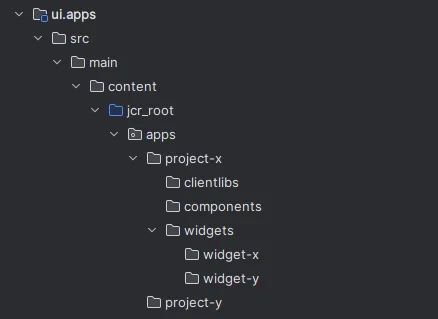
But another vendor may already have developed some widgets in this project. So if we just write filter rules like this:
<?xml version="1.0" encoding="UTF-8"?>
<workspaceFilter version="1.0">
    <filter root="/apps/project-x/clientlibs"/>
    <filter root="/apps/project-x/components"/>
    <filter root="/apps/project-x/widgets"/>
</workspaceFilter>
it is not going to work. This will just replace the existing widgets package and install the new one. We can add mode="merge" to the filter rules, but this isn’t ideal, because the new package’s primary type may not be exactly the same as the previous one.
We don’t want to touch the existing widgets’ properties.
Solution
The ideal approach is to introduce a new module called ui.apps.structure.
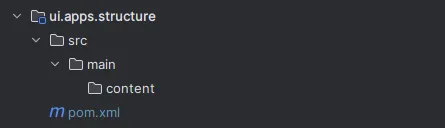
The POM file
The pom.xml file will look like this:
<?xml version="1.0" encoding="UTF-8"?>
<project xmlns="http://maven.apache.org/POM/4.0.0" xmlns:xsi="http://www.w3.org/2001/XMLSchema-instance" xsi:schemaLocation="http://maven.apache.org/POM/4.0.0 http://maven.apache.org/maven-v4_0_0.xsd">
    <modelVersion>4.0.0</modelVersion>

    <!-- ====================================================================== -->
    <!-- P A R E N T  P R O J E C T  D E S C R I P T I O N                      -->
    <!-- ====================================================================== -->
    <parent>
        <groupId>com.adobe.aem.tutorial</groupId>
        <artifactId>aem-tutorial</artifactId>
        <version>1.0.0-SNAPSHOT</version>
        <relativePath>../pom.xml</relativePath>
    </parent>

    <!-- ====================================================================== -->
    <!-- P R O J E C T  D E S C R I P T I O N                                   -->
    <!-- ====================================================================== -->
    <artifactId>aem-tutorial.ui.apps.structure</artifactId>
    <packaging>content-package</packaging>
    <name>AEM Tutorial - Repository Structure Package</name>
    <description>
        Empty package that defines the structure of the Adobe Experience Manager repository the Code packages in this project deploy into.
        Any roots in the Code packages of this project should have their parent enumerated in the Filters list below.
    </description>

    <build>
        <plugins>
            <plugin>
                <groupId>org.apache.jackrabbit</groupId>
                <artifactId>filevault-package-maven-plugin</artifactId>
                <configuration>
                    <properties>
                        <cloudManagerTarget>none</cloudManagerTarget>
                    </properties>
                    <filters>
                        <!-- /apps root -->
                        <filter><root>/apps</root></filter>
                        <filter><root>/apps/project-x</root></filter>
                        <filter><root>/apps/project-x/widgets</root></filter>
                        <!-- Common overlay roots -->
                        <filter><root>/apps/sling</root></filter>
                        <filter><root>/apps/cq</root></filter>
                        <filter><root>/apps/dam</root></filter>
                        <filter><root>/apps/wcm</root></filter>
                        <filter><root>/apps/msm</root></filter>

                        <!-- Immutable context-aware configurations -->
                        <filter><root>/apps/settings</root></filter>

                        <!-- DAM folder root, will be created via repoinit -->
                        <filter><root>/content/dam/project-x</root></filter>

                    </filters>
                </configuration>
            </plugin>
        </plugins>
    </build>
</project>
Here we have declared that the root of the widgets will be:
<filter><root>/apps/project-x/widgets</root></filter>It won’t touch anything up to the widgets folder in the repository.
Then we need to update the filter in ui.apps as well. The ui.apps filter will look like this:
<?xml version="1.0" encoding="UTF-8"?>
<workspaceFilter version="1.0">
    <filter root="/apps/project-x/clientlibs"/>
    <filter root="/apps/project-x/components"/>
    <filter root="/apps/project-x/widgets/widget-x"/>
    <filter root="/apps/project-x/widgets/widget-y"/>
</workspaceFilter>
The filter rules for the widgets become:
<filter root="/apps/project-x/widgets/widget-x"/>
<filter root="/apps/project-x/widgets/widget-y"/>
This way our project won’t touch the existing package. It will only install widget-x and widget-y, and everything that already exists stays as it is.
Adding the module
If this module isn’t generated automatically, we need to add it manually. After adding the package to the project, we need to add it to the POM files as well, so that it works as a module.
Main POM
Add it to the <modules> section as a module, for example <module>ui.apps.structure</module>:
<modules>
  <module>all</module>
  <module>core</module>
  <module>ui.frontend</module>
  <module>ui.apps</module>
  <module>ui.apps.structure</module>
  <module>ui.config</module>
  <module>ui.content</module>
  <module>it.tests</module>
  <module>dispatcher</module>
  <module>ui.tests</module>
</modules>
The ui.apps POM
In the ui.apps POM, add it in two sections. First, in the plugin section, as a repositoryStructurePackage:
<!-- ====================================================================== -->
<!-- V A U L T   P A C K A G E   P L U G I N S                              -->
<!-- ====================================================================== -->
<plugin>
    <groupId>org.apache.jackrabbit</groupId>
    <artifactId>filevault-package-maven-plugin</artifactId>
    <configuration>
        <properties>
            <cloudManagerTarget>none</cloudManagerTarget>
        </properties>
        <group>com.adobe.aem.tutorial</group>
        <name>aem-tutorial.ui.apps</name>
        <packageType>application</packageType>
        <repositoryStructurePackages>
            <repositoryStructurePackage>
                <groupId>com.adobe.aem.tutorial</groupId>
                <artifactId>aem-tutorial.ui.apps.structure</artifactId>
            </repositoryStructurePackage>
        </repositoryStructurePackages>
        <dependencies>
            <dependency>
                <groupId>com.adobe.cq</groupId>
                <artifactId>core.wcm.components.content</artifactId>
            </dependency>
            <dependency>
                <groupId>com.adobe.cq</groupId>
                <artifactId>core.wcm.components.config</artifactId>
            </dependency>
        </dependencies>
    </configuration>
</plugin>
Then in the dependency section, as a dependency:
<dependency>
    <groupId>com.adobe.aem.tutorial</groupId>
    <artifactId>aem-tutorial.ui.apps.structure</artifactId>
    <version>${project.version}</version>
    <type>zip</type>
</dependency>
The ui.config POM
If the project has a ui.config module, add it there too, again in two sections. First, in the plugin section, as a repositoryStructurePackage:
<build>
    <sourceDirectory>src/main/content/jcr_root</sourceDirectory>

    <plugins>
        <plugin>
            <groupId>org.apache.jackrabbit</groupId>
            <artifactId>filevault-package-maven-plugin</artifactId>
            <configuration>
                <properties>
                    <cloudManagerTarget>none</cloudManagerTarget>
                </properties>
                <packageType>container</packageType>
                <showImportPackageReport>false</showImportPackageReport>
                <repositoryStructurePackages>
                    <repositoryStructurePackage>
                        <groupId>com.adobe.aem.tutorial</groupId>
                        <artifactId>aem-tutorial.ui.apps.structure</artifactId>
                    </repositoryStructurePackage>
                </repositoryStructurePackages>
            </configuration>
        </plugin>
        <plugin>
            <groupId>com.day.jcr.vault</groupId>
            <artifactId>content-package-maven-plugin</artifactId>
        </plugin>
    </plugins>
</build>
Then in the dependency section, as a dependency:
<dependencies>
    <dependency>
        <groupId>com.adobe.aem.tutorial</groupId>
        <artifactId>aem-tutorial.ui.apps.structure</artifactId>
        <version>${project.version}</version>
        <type>zip</type>
    </dependency>
</dependencies>
With the module added to the project, we can take advantage of it.
This example is only a demonstration. The same module helps with much bigger challenges: for example, custom tools that need to overlay nodes from /libs to /apps.